Guide
pourquoi.app on iPhone: the complete setup guide
Set up pourquoi.app's Shortcuts automation on iPhone step by step, plus the exact setting that silently breaks it if you miss it.
Published on September 7, 2026 5 min read
Written by Nicolas Carrion creator of pourquoi.app
On iPhone, pourquoi.app does not rely on system permissions the way it does on Android. It relies entirely on a Shortcuts automation that you create once, yourself. That is the only way the app can show its question at the right moment: without it, there is literally nothing running in the background, and the app has no purpose.
The good news: it takes about a minute, and once done, you never touch it again. The part that trips people up is not complicated, but it is precise: one wrong setting on a single screen (“Run After Confirmation” instead of “Run Immediately”) is enough to silently break the whole thing.
In short: you create a personal automation in Shortcuts, triggered by opening an app, that runs the “Ask Why” action with its context set to the app currently in use. The one thing to get right: choose “Run Immediately”, not “Run After Confirmation”.
Before you start
From inside pourquoi.app, the help screen (Settings → Set up automation) has a “Create the automation” button that jumps straight into Shortcuts at the right screen. You can also open Shortcuts manually: Automation tab, then the + button in the top right.
Step 1: create the automation
1. Tap “Create the automation”.
2. Select the trigger linked to opening an app. From the trigger list, choose App.
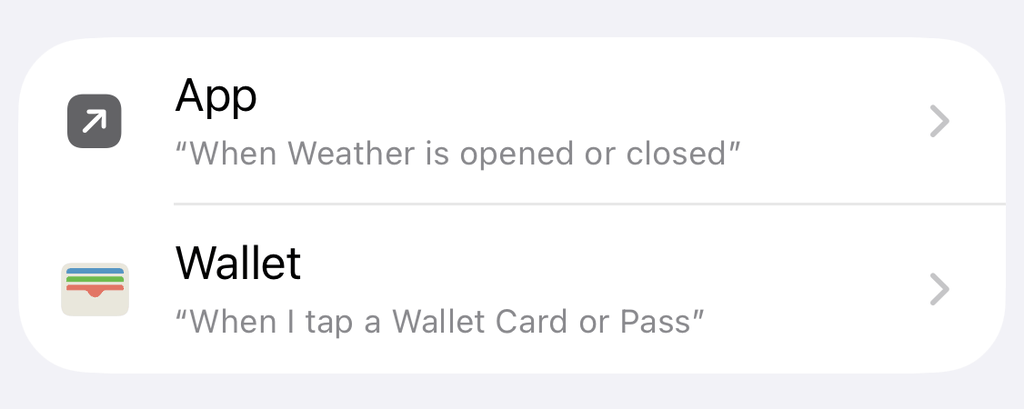
3. Choose the apps you open out of habit (social media, games, news…). You can change this list later.
Step 2: the setting that breaks everything if you miss it
4. Enable “Run Immediately”. This is the single most important step in this guide. By default, Shortcuts offers “Run After Confirmation”, which shows a confirmation alert every time you open a monitored app instead of directly asking pourquoi.app’s question. Choose Run Immediately, and leave Notify When Run off.
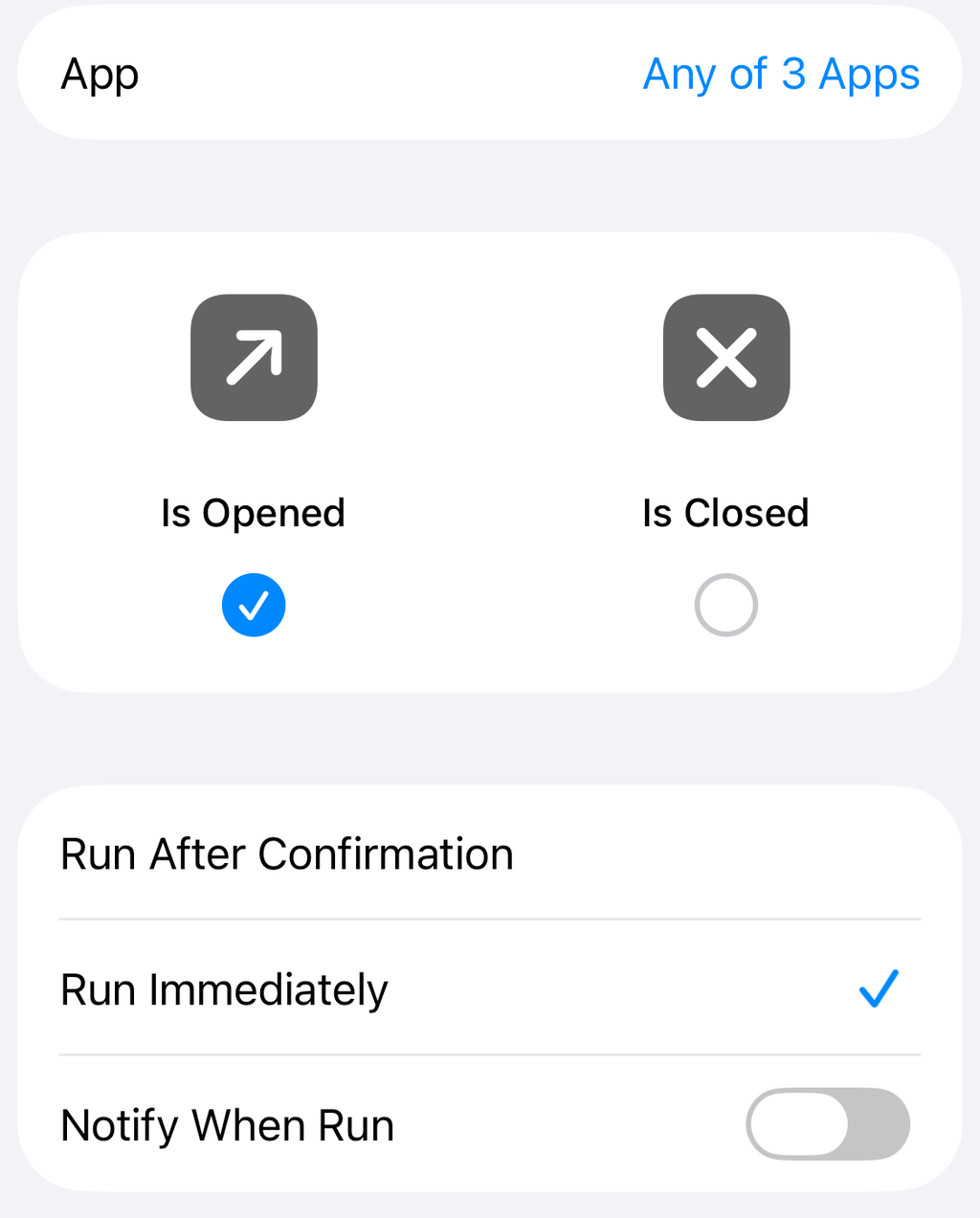
5. Tap “Next”.
Step 3: add the pourquoi.app action
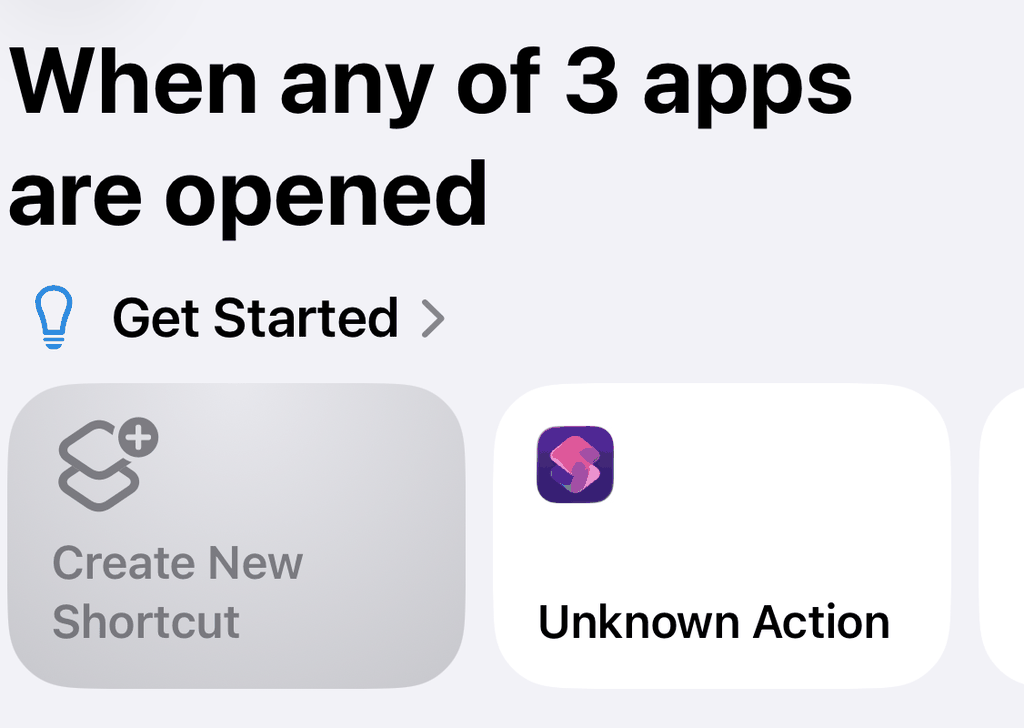
6. Choose “Create New Shortcut” in the Get Started section, instead of picking an existing shortcut from the list.
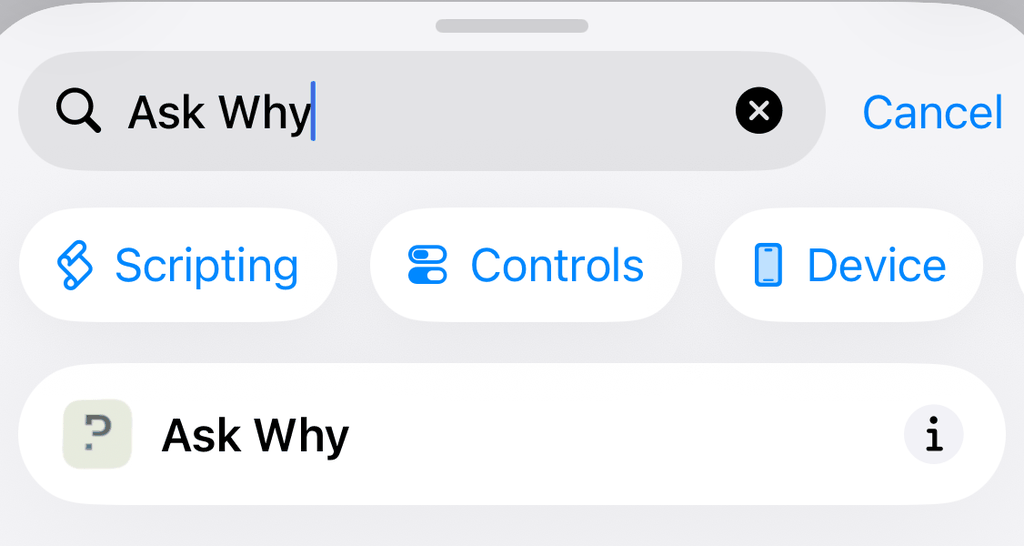
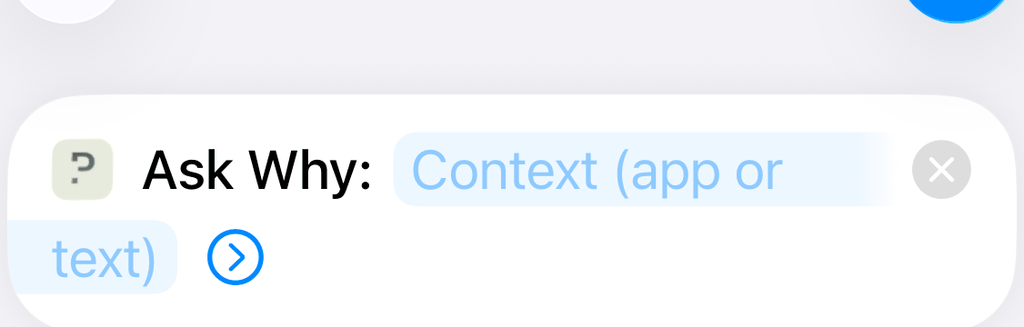
7. In the search bar, type “Ask Why”, then choose the “Ask Why” action.
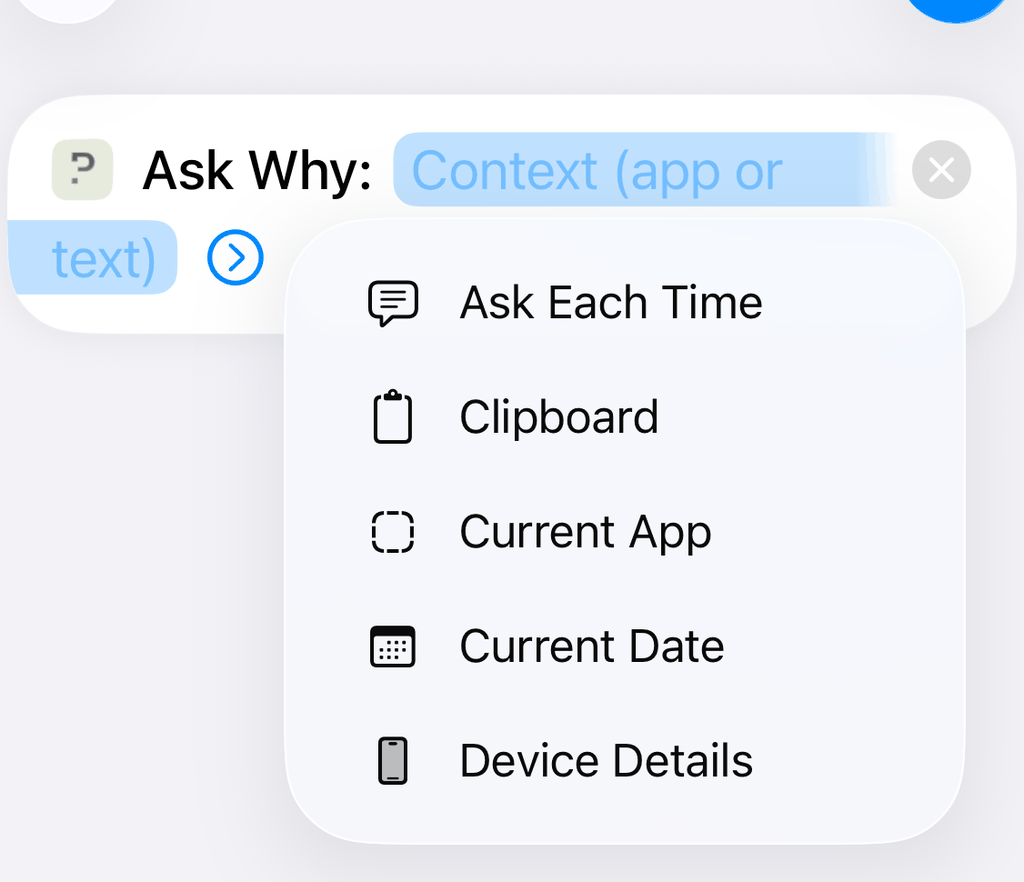
8. Long-press the “Context (app or text)” parameter, then choose “Current App”. This is what lets pourquoi.app know which app you just opened.
9. Confirm the creation.
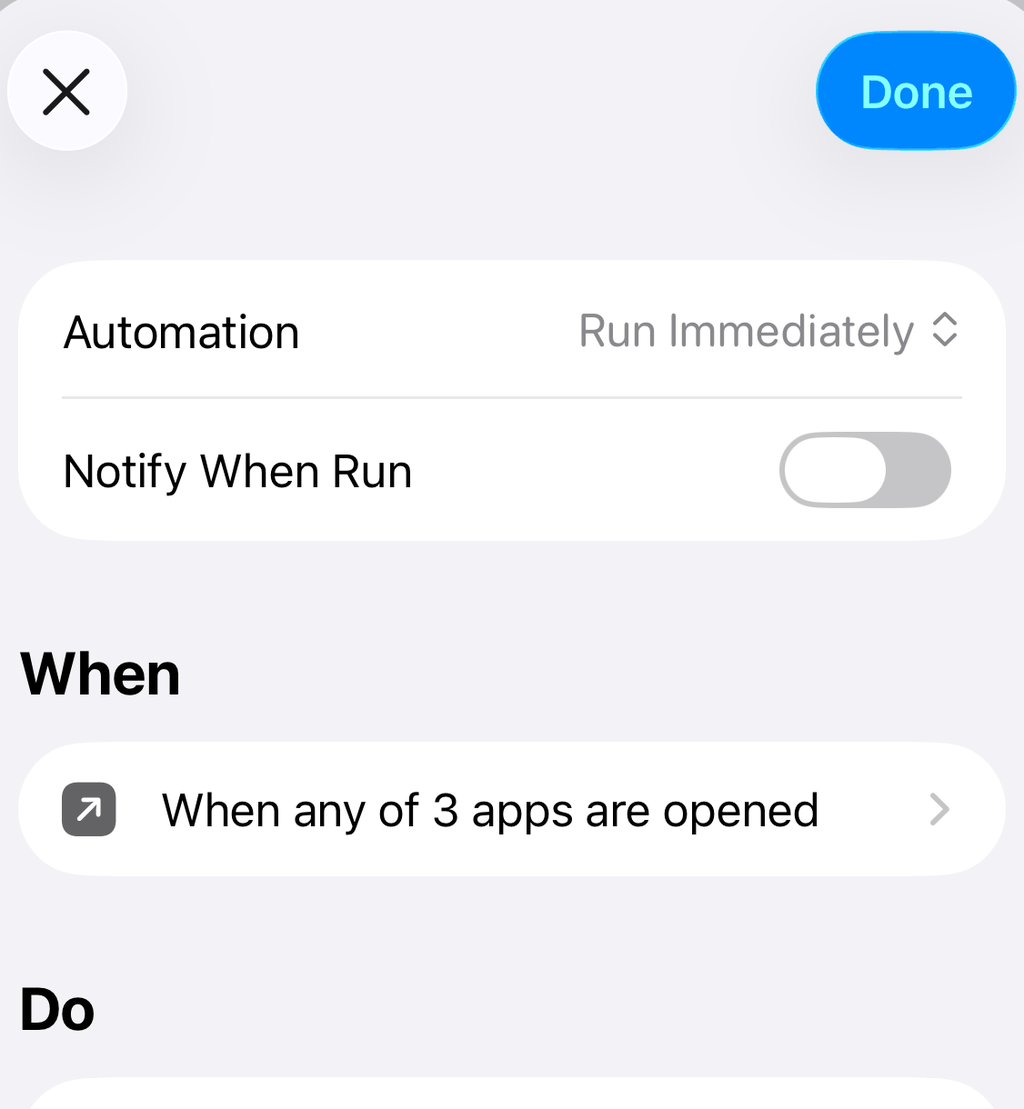
The automation is active immediately, no need to restart your phone or the app.
Verify it works
Open one of the apps you selected in step 1. pourquoi.app’s question should appear directly, with no confirmation alert first. If an iOS alert asks you to confirm before running, go back to step 2: the “Run Immediately” setting did not take.
Troubleshooting
Nothing appears, not even an alert. Open Shortcuts → Automation tab, and check the automation exists and is enabled (the toggle at the top of its detail page). If it’s not there, redo step 1.
A confirmation alert appears every time you open an app. That’s the sign “Run After Confirmation” is still active. Open the automation in Shortcuts, and switch it back to “Run Immediately”.
“Ask Why” doesn’t show up when searching for actions. Open pourquoi.app once (even just the home screen), then go back to Shortcuts. iOS sometimes takes a moment to index a newly installed app’s actions.
It worked, then stopped after an update. Automations can get disabled after reinstalling pourquoi.app or a major iOS update. Check in Shortcuts → Automation that it still exists; if it’s gone, recreate it following the same steps.
Frequently asked questions
I created the automation but the question never appears. Why?
Check that you chose “Run Immediately” and not “Run After Confirmation” when creating it. Without that exact setting, iOS either asks for confirmation every time instead of showing the question directly, or the automation doesn’t fire silently at all.
I can’t find “Ask Why” when searching for the action in Shortcuts. What do I do?
Open pourquoi.app once, then go back to Shortcuts. iOS sometimes takes a moment to index a newly installed app’s actions.
It worked, then stopped after an update or reinstall. What happened?
Shortcuts automations can get disabled after reinstalling the app or a major iOS update. Open Shortcuts → Automation tab, and check the automation still exists and is enabled. If it’s gone, you’ll need to recreate it.
Does this work if the Shortcuts app is closed?
Yes. A personal automation is triggered by iOS itself, not by the Shortcuts app being open. You don’t need to keep Shortcuts running in the background for it to work.
Still stuck?
If you have followed every step and it still is not working, contact us with your iPhone model and iOS version. For the reasoning behind why pourquoi.app works through an automation rather than blocking apps outright, see how to reduce screen time on iPhone without a blocker.
Why not give it a try?
pourquoi.app asks a calm question before you open. The question on opening is free, with no blocker. A second of pause can change your day.