Guide
Screen time: seven days to see where it actually goes
A back-to-school diagnosis in seven days: observe, count, then decide. How to run the week with pourquoi.app, without blocking or deleting anything.
Published on September 7, 2026 14 min read
Written by Nicolas Carrion creator of pourquoi.app
Seven days, ideally the first week of term, are enough to put a number on what your phone takes from you. On one condition: change nothing during those seven days.
You answer a one-second question every time you open the apps you picked, and on day eight you decide with numbers instead of an impression.
In short: a week of observation beats a Sunday night resolution. You block nothing, you delete nothing: you name the reason for each opening, in one tap. After seven days you can see the slots that keep coming back, the reason that dominates and the app that really weighs. Then, one correction at a time.
Let me say it straight away: I built pourquoi.app. It is an iPhone and Android app that asks a question the moment you open an app you designated, and it starts with a seven-day trial. So you are reading a protocol written by the person with the most to gain from you subscribing at the end of those seven days. I try to make up for it by also saying, further down, what stays free and when not to pay.

Observe before deleting
Deleting an app already answers a question you never asked. You decide the culprit is Instagram, or TikTok, or the course group chat. You uninstall. Three days later you reinstall, and you have learned nothing, except that you last three days.
The counters on your phone give you a duration. A duration does not say why. Two hours in a messaging app can be two hours of group work or two hours waiting for a reply that never comes. The number is the same, the conclusion is the opposite.
The missing data point is not the duration, it is the reason. And the reason evaporates fast. If I ask you tonight why you opened your phone at 2.20 pm, you will not know: you will reconstruct something plausible. That is why the question arrives as the app opens, not in an evening questionnaire. The one second when the answer is still accurate is that one.
What Screen Time and Digital Wellbeing do not show
Your phone already ships a counter: Screen Time on iPhone, Digital Wellbeing on Android. They are free, they are serious, and I am not asking you to replace them. pourquoi.app leans on the duration they measure.
| What you are after | Screen Time (iOS) | Digital Wellbeing (Android) | pourquoi.app |
|---|---|---|---|
| Duration per app | Yes | Yes | Reuses the phone’s measurement |
| Number of openings | Yes, pickups and first app used | Yes, opens per app | Yes, for the apps you designated |
| Reason for the opening | No | No | Yes, one tap as you open |
The column missing everywhere else is the third one, and no system can reconstruct it afterwards: neither Apple, nor Google, nor a third-party tool knows why your hand went for the icon. You know, for one second.
Why the first week of term
A diagnosis is worth what the week you run it in is worth. A holiday week looks nothing like what comes next, and neither does an exam week. The start of term is the moment your timetable settles back into place: classes at fixed hours, commutes, group chats forming again. You are measuring the version of your usage that will hold for the months ahead.
It has a second, purely practical advantage: it gives you a dated point of comparison. Running seven days again in November only means something if you have a reference week.
Day 1: choosing the apps to watch
The first decision is the only one that really counts: which apps trigger the question. Three to five, no more. Watching your whole phone produces noise: you will answer a question opening your banking app, your calendar, your transit app, and you will get tired of it before day 4. A diagnosis abandoned on day 4 is worth nothing.
Take one app from each of these three categories.
- The one you open without thinking. Your hand gets there before the thought does, often a social network or a video feed.
- The one that is legitimate but stretchy. Messaging, uni email, a notes app. You have a reason to go there. The question is how many times a day.
- A control app, one you are sure is harmless. It is the control arm of your experiment, the only one that can contradict you: if it comes out on top of your openings, your starting intuition was wrong, and that is already a result.
Change no setting during the week
By default the question appears when you open the selected apps, and during the trial you have access to everything, including the setting that spaces the questions out. Resist the urge to lower it on day 2: if you change the frequency midway, your day 5 numbers are no longer comparable to day 1, and you will not have a curve but two halves of two curves. Same logic for your app selection: an app added on day 3 will not have seven days of data, so read it separately and keep it for your next diagnosis. Removing one, on the other hand, damages nothing you have already collected.
What actually happens when you open an app
You launch the watched app. The question slips in: why are you opening it. You write nothing, you tap one reason, and the app opens normally. Nothing is blocked, nothing is delayed beyond that second.

The available answers are short and always the same: communicate, search, work, entertain myself, and a last one that says there was no reason. That last one carries the diagnosis. Its share, app by app and slot by slot, is the piece of information your phone will never produce on its own.
To react to those openings, the app needs a permission you grant at install time: the flow differs between iPhone and Android, and it is covered step by step in the iPhone setup guide and the Android guide. The principle does not move: you declare the apps, the app reacts when they open, and it goes looking nowhere else.
What you read day after day
The day view gives you three things: how many times you opened each watched app, which reasons come back, and at what times.
The figure that surprises is almost never the duration, it is the number of openings. We have a fairly accurate sense of the time we spend somewhere, and a very wrong sense of how often we go back. Twenty two-minute openings do not feel like forty minutes. They feel like nothing at all.
Draw no conclusion from the first day. Knowing you are being watched changes behaviour: your Monday numbers will be lower than reality. That is not a flaw in the measurement, it is the tool’s first effect, and it happens to measure the share of your openings that does not survive one second of thought. After two or three days the question becomes routine again and the numbers settle.
What the day view is really for is spotting the slots: waking up, between two classes, after 10 pm. Look at it once a day, in the evening, for two minutes. Checking your stats every hour is another way of spending time on your phone.
What you read after seven days
Seven days is not “more data than one day”, it is a different unit: a full cycle. For a student, the week is the only meaningful grain, because your life is organised by a weekly timetable. One day gives you an anecdote, seven days give you a structure.
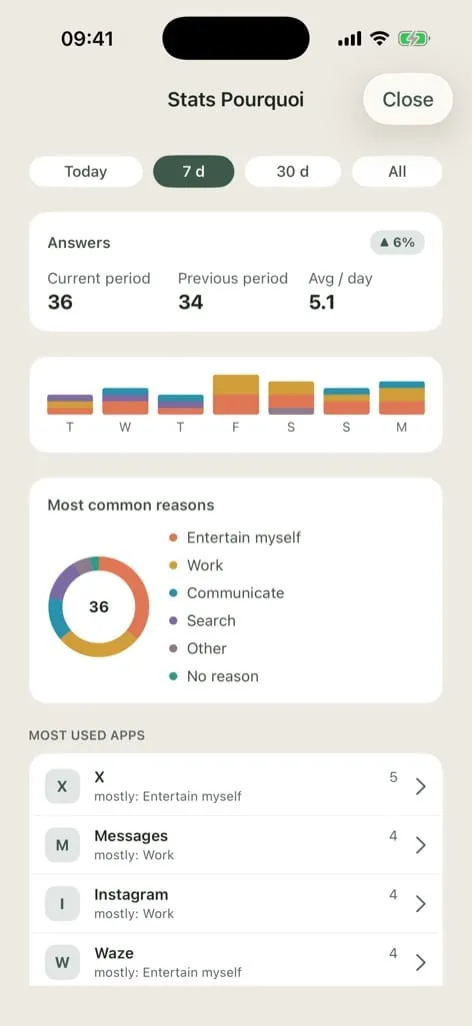
- The weekday versus weekend contrast. Some people find their usage explodes on Saturday, others that it explodes precisely on the busiest days. Both exist, and they do not call for the same decision.
- The quiet day. There is almost always one day that drops away from the rest. Understanding what made it different is worth more than ten resolutions.
- The dominant reason. Over one day your answers are anecdotal. Over seven days one reason rises to the top, and it is not always the one you expected.
- How regular the slots are. One spike at 11 pm is an evening. A spike at 11 pm six nights out of seven is a habit, and habits are treated differently.
That is why the trial lasts seven days and not three: below that, you do not have a cycle, you have fragments.
Cross-reading your answers with your screen time
This cross-reading produces the one genuinely actionable piece of information of the week: what share of your openings happened on autopilot, and which apps they cluster in.
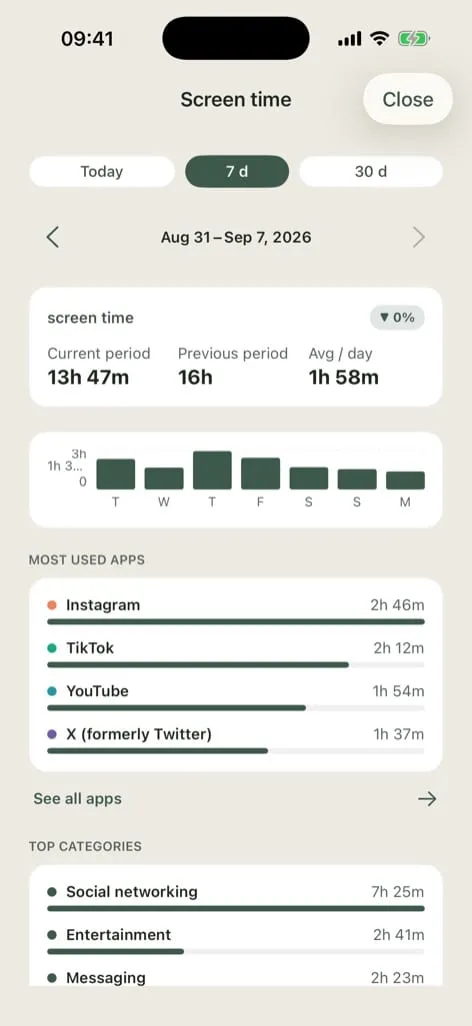
The result is never “I spend too much time on my phone”. It is more precise: on this app, a good share of my openings had no reason, and it is also the one my phone says I spend the most time in. You can do something with that sentence. With “I’m addicted”, you cannot.
One point of honesty: your answers document a reason per opening, not a duration per opening. The app puts an app’s screen time next to the reason that dominates on that app. It is a reading, not an equation: I cannot tell you a habit cost you exactly so many minutes. A share of openings with no reason, sitting next to a screen time total, is already plenty to decide on.
If you want an order of magnitude before you even start, the screen time calculator does the maths in your browser, no sign-up.
Three possible readings after a week
Three configurations the cross-reading brings out. These are scenarios, not app statistics: see which one looks like your numbers. It is quite possible none of them fits, and that is fine, it is your diagnosis, not mine.
The volume is fine, fragmentation is the problem. Your total screen time is reasonable, but the openings are many and the sessions very short. The problem is not lost time, it is chopped-up attention. What that calls for: fewer returns rather than shorter sessions, and working in blocks with the phone out of reach. The article on staying focused without a blocker covers this case.
One app, two slots. Most of your openings come from one app, concentrated in two moments, typically waking up and going to bed. The rest is healthy. What that calls for: a local decision, not a global one. It is not about “less phone”, it is about two precise slots, and that is far easier to hold. For the evening one, the last scroll before bed deals with exactly that.
It is not the app, it is the moment. Your openings land right before starting something hard: opening a lecture, starting an assignment, sitting down to revise. The app is only a support, the trigger is the transition. What that calls for: leave the app alone, work on starting the task.
Day eight: what you decide
After seven days the Premium trial ends. The app does not close: the question on opening stays available with no limit, and you keep the stats for your answers today and over the last seven days. What closes is the part that serves action rather than measurement: the cross-reading with your screen time, adjustable question frequency, the weekly recap at a time you choose, and the long history that lets you compare October to September. Three ways out, then.
You stop there. The diagnosis is done, you know your numbers, you apply your correction without paying anything. That is a perfectly legitimate outcome. One precaution: write down or screenshot your week’s numbers before the trial ends, because the detailed views will no longer be shown afterwards.
You take a plan. Monthly, yearly or lifetime. Monthly is the right way in if you want to check your correction holds for a month, yearly if you want to follow a school year, lifetime is a one-off purchase with no renewal. The seven-day trial itself applies to monthly or yearly and goes through the App Store or Google Play: you can cancel before the seven days are up. I am not copying prices here, the ones the store shows at purchase time are the ones that count.
You run another week of observation later. Nothing forces you to carry straight on. Seven-day stats for your answers stay free: one week at the start of term, another before exams, two useful and very different snapshots. What you will miss is the cross-reading with screen time, not the count.
On iPhone, Premium is shared through Apple Family Sharing: one bill for the group, but everyone picks their own watched apps and sees only their own stats. On Android, that sharing is not offered.
A word for the parents reading over a shoulder: the app blocks nothing, monitors nobody remotely and has no parental dashboard. It asks a question to whoever opens the app and shows them their own stats. It is a tool for noticing, not a tool for control. What is asked when the account is created, where answers are kept and for how long is written in the privacy policy, and that is what counts, not a paragraph in an article.
The protocol in one table
| Day | What you do | What you look at |
|---|---|---|
| 1 | Pick 3 to 5 apps, including a control app. Change no setting. | Nothing. Day 1 is not representative. |
| 2 and 3 | Just answer. | The day view, two minutes in the evening. |
| 4 | Hold on: this is the day people quit. | The number of openings, not the duration. |
| 5 and 6 | Include a free day if you can. | The contrast between class days and free days. |
| 7 | Read the seven-day view and the cross-reading with screen time. | Recurring slots, the dominant reason. |
| 8 | Write your numbers down. Decide: correction only, subscription, or pause. | One correction at a time. |
One rule to finish the week: a single correction. Pick the slot or the app that stands out most clearly and work on that one alone for the next two weeks. Seven days of data do not justify seven simultaneous changes.
Frequently asked questions
Does the app block the apps I choose?
No. It slips a question in as the app opens, you tap one reason, then the app opens normally. Nothing is locked, nothing is forbidden. The point is to make the habit visible, not impossible.
Answering a question every time I open an app, isn’t that unbearable?
The answer takes a second and fits in one tap. During the diagnosis week, keep the default setting so your numbers stay comparable. After that, question frequency is adjustable, and that setting is part of Premium.
What happens when the seven-day trial ends?
The app stays usable for free: the question on opening, with no limit, and the stats for your answers today and over the last seven days. What closes is the cross-reading with your screen time, the habit readings, history beyond seven days, adjustable frequency and the weekly recap.
Who writes here
I designed and built pourquoi.app, and I run this protocol on my own phone at the start of every term. My background and how to reach me are on the about page.
Why not give it a try?
pourquoi.app asks a calm question before you open. The question on opening is free, with no blocker. A second of pause can change your day.